 GNU ELPA: colorful-mode
colorful-mode 
- Description
- Preview any color in your buffer in real time
- Latest
- colorful-mode-1.2.6.tar (.sig), 2026-Oct-16, 90.0 KiB
- Maintainer
- Jen-Chieh <jcs090218@gmail.com>
- Elias G. Perez <eg642616@gmail.com>
- Other versions:
- development version
- Website
- https://github.com/DevelopmentCool2449/colorful-mode
- ELPA's Repository
- CGit or Gitweb
- All Dependencies
- compat (.tar)
- cl-lib (.tar)
To install this package from Emacs, use package-install or list-packages.
Full description



🎨 colorful-mode is a minor mode that highlights color formats such as
hexadecimal, color names, etc. in real time inspired on
rainbow-mode.el.
1. Features
- Real time color highlight.
- Supports:
- Hexadecimal formats:
RRGGBBand#RGB, including alpha variants:#RRGGBBAAand#RGBA. - Supported Emacs color names
- CSS:
- HTML/CSS specific color names
rgb/rgbahsl/hslaoklab/oklch@define-colorCSS-specific variables (used only in gtk's CSS files)var()CSS-specific variables
- LaTeX colors:
gray,rbg,RGB,HTML - ANSI Shell color codes (partially)
- Hexadecimal formats:
- Convert current color at point or in the current region to other formats such as hexadecimal or color names (only available for some colors) with mouse click support.
- Prefix/suffix indicator instead highlight (Optional).
- Highlight only in strings (Optional).
- Extensible highlighting (See colorful-colors.el file).
- Blacklist color keywords from being highlighted.
2. Screenshots
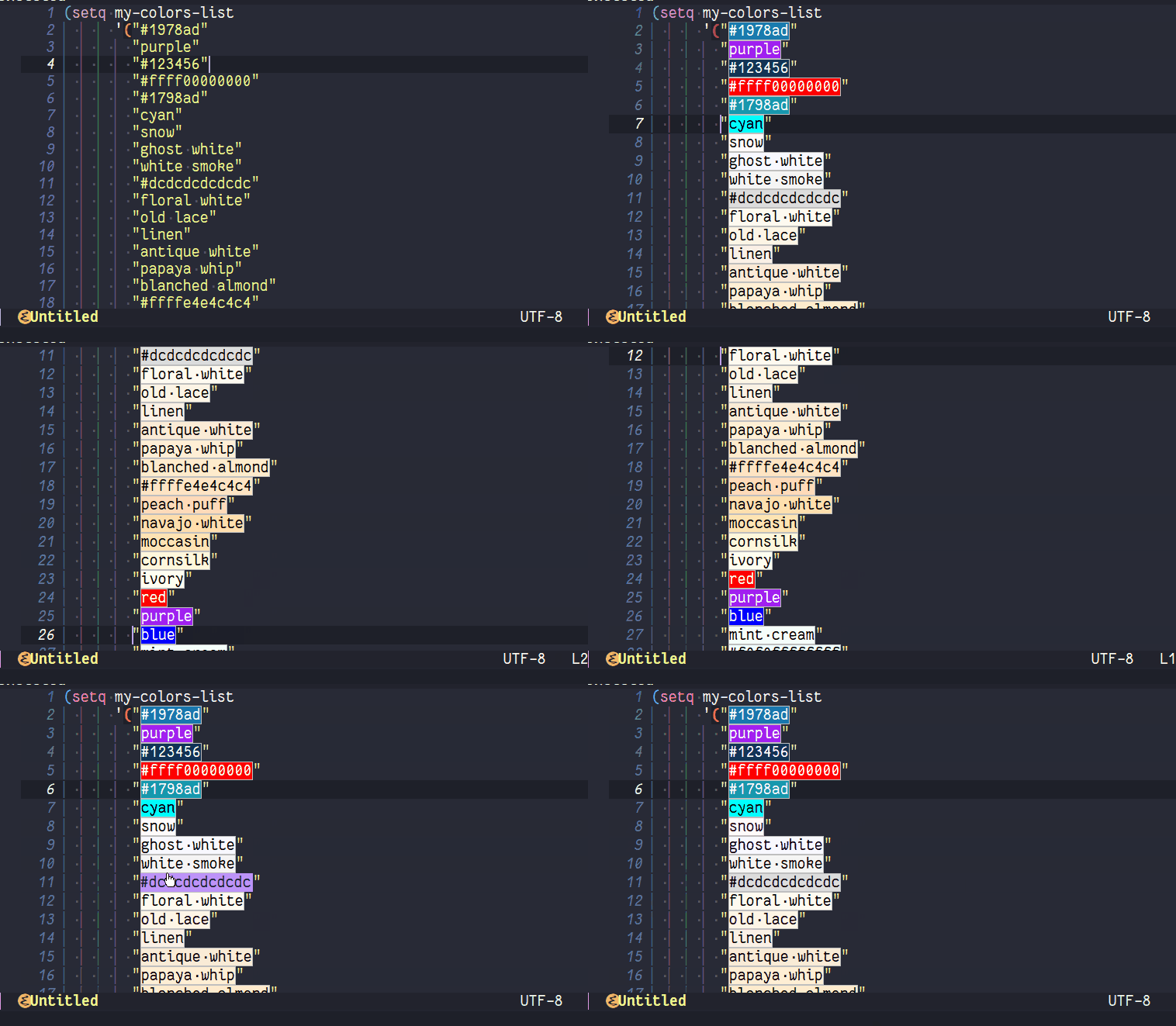
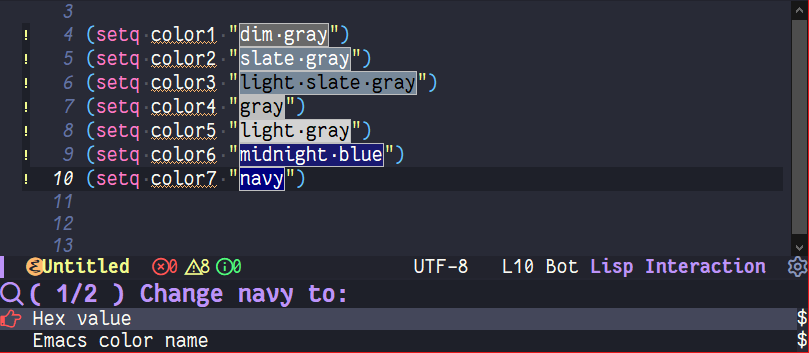 Supports for both GUI/TUI.
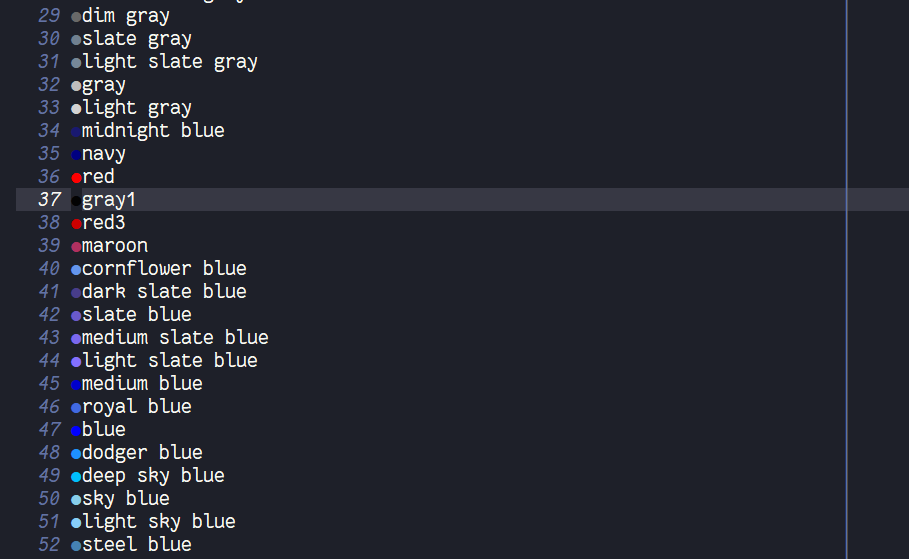 Support for custom color string indicator.
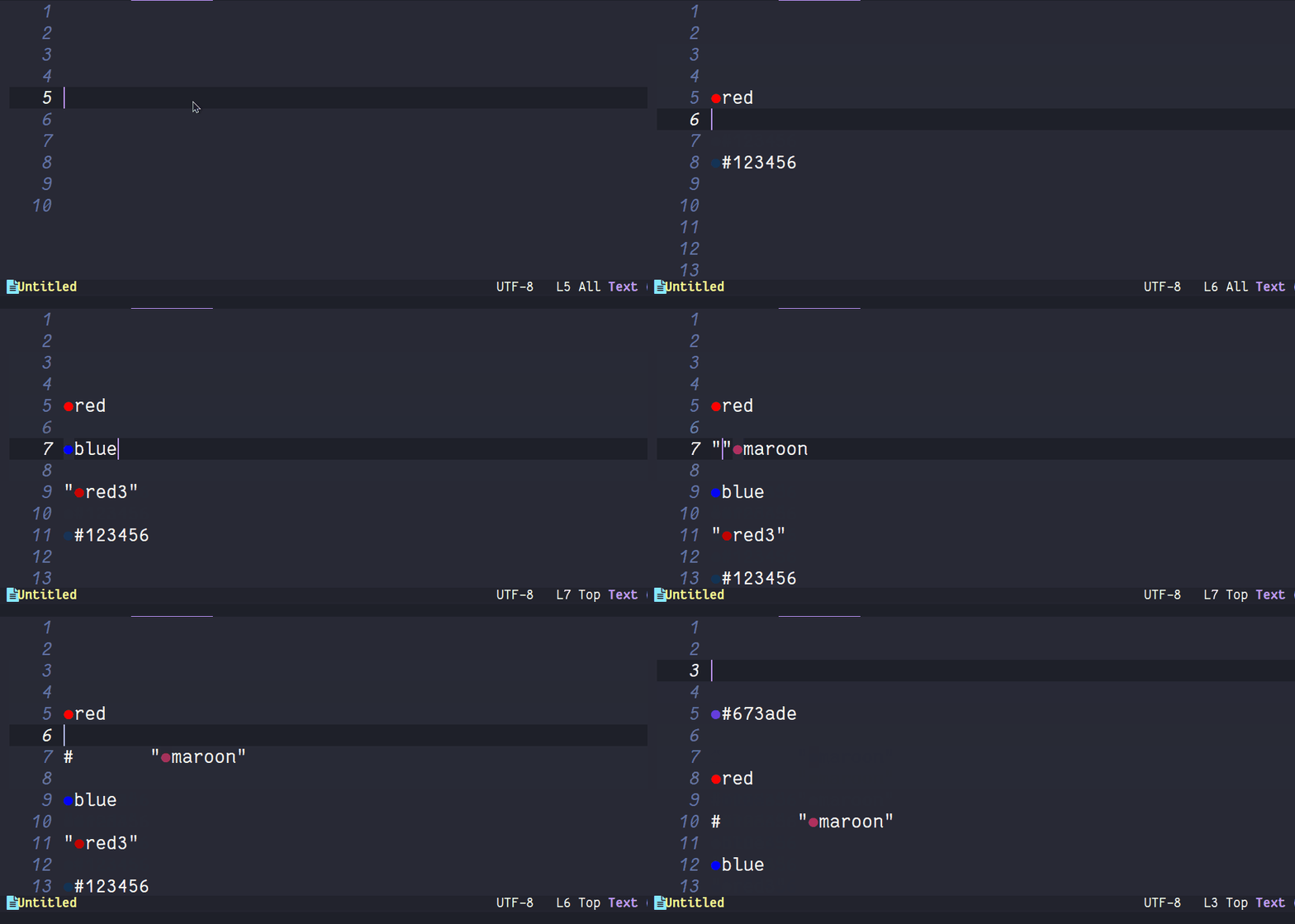
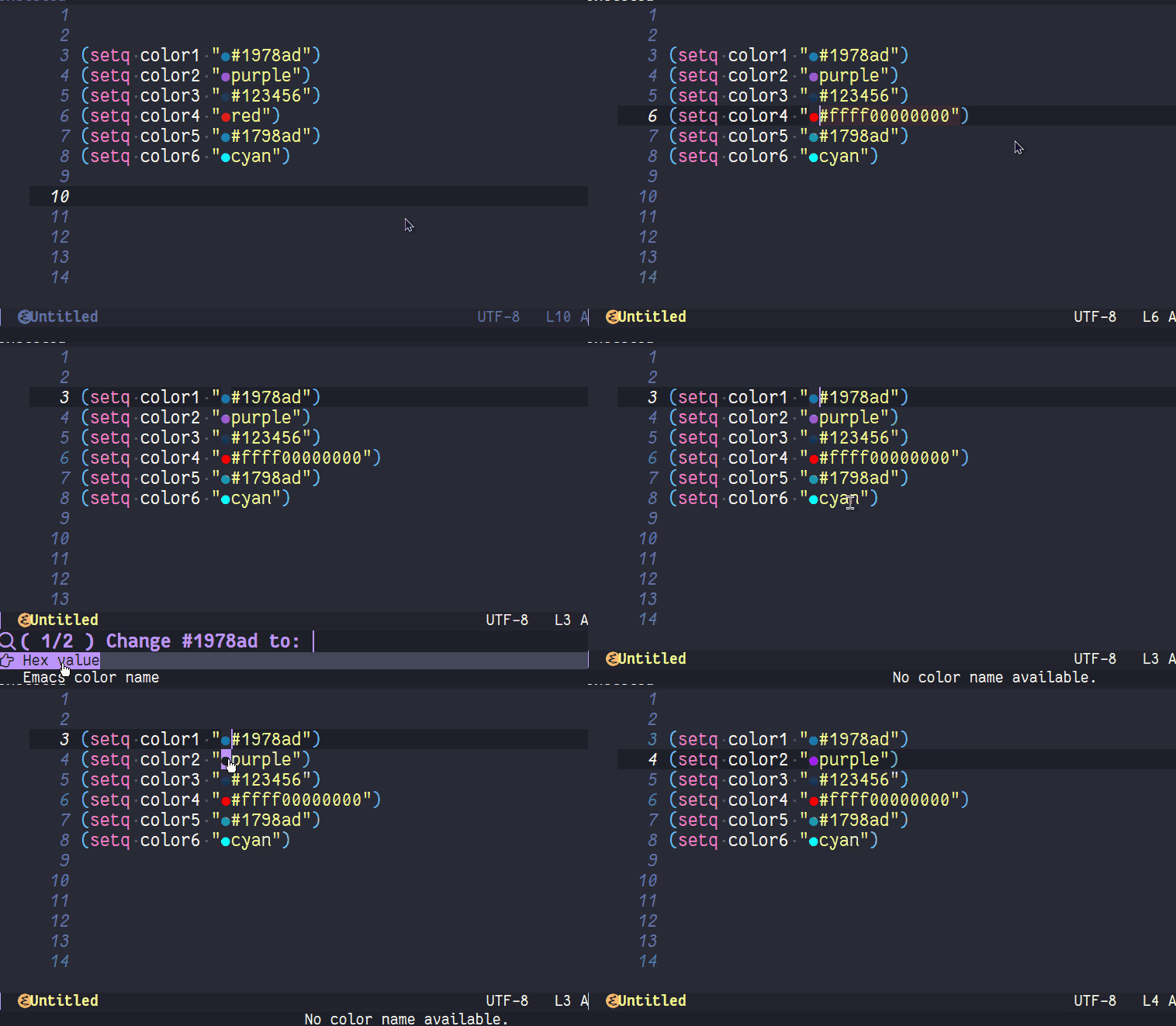 Change color support in real time.
 Support for color changing at region.
3. User Options
3.1. Customizable User options
colorful-allow-mouse-clicks (default: t)If non-nil, allow using mouse buttons for change color.colorful-use-prefix (default: nil)If non-nil, use prefix for preview color instead highlight them.
[!WARNING]
css-mode derived modes colorize rgb and hex colors out the box, this may interfere with colorful prefix, you can disable this setting 'css-fontify-colors' to nil
colorful-prefix-string (default: "●")String to be used in highlights.colorful-prefix-alignment (default: 'left)The position to put prefix string.colorful-extra-color-keyword-functionsList of functions to add color highlighting to colorful-color-keywords.colorful-exclude-colors (default: '("#define"))List of keywords not to highlight.colorful-short-hex-conversions (default: t)If non-nil, colorful will converted long hex colors to \"#RRGGBB\" format.colorful-only-strings (default: nil)If non-nil, colorful will only highlight colors inside strings.colorful-highlight-in-comments (default: nil)If non-nil, colorful will highlight colors inside comments.colorful-html-colors-alistAlist of HTML colors. Each entry should have the form (COLOR-NAME . HEXADECIMAL-COLOR).global-colorful-modes (default: '(prog-mode help-mode html-mode css-mode latex-mode))Which major modes global-colorful-mode is switched on in (globally).
3.2. Faces
colorful-baseFace used as base for highlight color names. Changing background or foreground color will have no effect.
3.3. Interactive User Functions.
colorful-change-or-copy-colorChange or copy color at point to another format.colorful-convert-and-change-colorConvert color at point or colors in region to another format.colorfu-convert-and-copy-colorConvert color at point to another format and copy it to the kill ring.colorful-modeBuffer-local minor mode.global-colorful-modeGlobal minor mode.
3.4. Key bindings
These key bindings are defined by: colorful-mode-map
C-x c x→colorful-change-or-copy-color.C-x c c→colorful-convert-and-copy-color.C-x c r→colorful-convert-and-change-color.
4. Setups and Guides
4.1. Enabling colors to specifics major-modes
If you want to use CSS rgb() colors outside CSS-mode derived modes,
you can add them to the user-option
colorful-extra-color-keyword-functions in your configuration.
(add-to-list 'colorful-extra-color-keyword-functions '(<<your-major-mode>> . colorful-add-rgb-colors))
This will add CSS's rgb highlighting to <<your-major-mode>> mode and its derived modes.
If you want to add more than one color highlighting to the same major-mode (e.g. CSS's HSL and RGB together) you can use this format:
(add-to-list 'colorful-extra-color-keyword-functions '(<<your-major-mode>> . (colorful-add-rgb-colors colorful-add-hsl-colors)))
colorful provides extra functions out-the-box that enable additional highlighting:
colorful-add-hex-colors: Enable Hexadecimal colors highlighting.colorful-add-emacs-color-names-colors: Enable Emacs-specific color names highlighting. (Useful for theme creators)colorful-add-web-color-names-colors: Enable CSS/HTML specific color names highlighting.colorful-add-css-variables-colors: Enable CSS-specific user-defined color variables highlighting.colorful-add-rgb-colors: Enable CSS RGB colors highlighting.colorful-add-oklab-oklch-colors: Enable CSS OkLab and OkLch colors highlighting.colorful-add-hsl-colors: Enable CSS HSL colors highlighting.colorful-add-latex-colors: Enable LaTeX rgb/RGB/HTML/Grey colors highlighting.colorful-add-ansi-shell-colors: Enable ANSI shell color codes highlighting.
(See: colorful-extra-color-keyword-functions user-option for more details.)
5. Usage and Installation
Emacs-28.1 (or a higher version) is required to install colorful-mode.
To install colorful-mode you can run: M-x package-install colorful-mode RET
When it is installed you can enable colorful-mode locally in your
current buffer with M-x colorful-mode. To enable it globally you can
run M-x global-colorful-mode.
6. Configuration
Example (Personal) configuration for your init.el:
(use-package colorful-mode
  ;; :diminish
  ;; :ensure t ; Optional
  :custom
  (colorful-use-prefix t)
  (colorful-only-strings 'only-prog)
  (css-fontify-colors nil)
  :config
  (global-colorful-mode t)
  (add-to-list 'global-colorful-modes 'helpful-mode))
6.1. Disable colorful in regions
If you want to disable colorful at region this hack may be useful for you:
(add-hook 'post-command-hook
          (lambda ()
            "delete colorful overlay on active mark"
            (when-let* (colorful-mode
                        (beg (use-region-beginning))
                        (end (use-region-end)))
              ;; Remove full colorful overlay instead only the part where
              ;; the region is.
                  (dolist (ov (overlays-in beg end))
                    (when (overlay-get ov 'colorful--overlay)
                      (delete-overlay ov))))))

(add-hook 'deactivate-mark-hook
          (lambda ()
            "refontify deleted mark"
            (when-let* (colorful-mode
                        (beg (region-beginning))
                        (end (region-end)))
              (font-lock-flush beg end))))
7. How does it compare to rainbow-mode or css-mode (with css-fontify-colors)?
| Comparison | colorful-mode.el | rainbow-mode.el | built-in css-mode |
|---|---|---|---|
| Compatible with hl-line and other overlays? | ✓ | ❌ | ❌ |
| Convert color to other formats? | ✓ | ❌ | ✓ |
| Optionally use string indicator prefix/suffix instead highlight | ✓ | ❌ | ❌ |
| Blacklist colors? | ✓ | ❌1 | ❌ |
| Allow highlight specifics colors in some modes | ✓ | ✓2 | ❌ |
| Optionally highlight only in strings | ✓ | ❌ | ❌ |
[1] rainbow-mode (like colorful) uses regex for highlight some
    keywords, however rainbow-mode can't exclude some colors.
[2] Only for some colors.
As an additional note, colorful-mode can be heavy than
rainbow-mode and css-mode, since colorful-mode uses overlays
instead of text-properties (which these last two use), however using
overlays allows colorful-mode to be used in any buffer and
major-mode.
8. How to Contribute
colorful-mode is part of GNU ELPA, if you want send patches you will need assign copyright to the Free Software Foundation. Please see the CONTRIBUTING.org file for getting more information.

Old versions
| colorful-mode-1.2.5.tar.lz | 2025-Nov-22 | 13.2 KiB |
| colorful-mode-1.2.4.tar.lz | 2025-May-30 | 13.2 KiB |
| colorful-mode-1.2.3.tar.lz | 2025-Mar-06 | 13.4 KiB |
| colorful-mode-1.2.1.tar.lz | 2025-Mar-05 | 13.4 KiB |
| colorful-mode-1.2.0.tar.lz | 2025-Feb-16 | 12.3 KiB |
| colorful-mode-1.1.0.tar.lz | 2025-Feb-07 | 11.0 KiB |
| colorful-mode-1.0.4.tar.lz | 2024-Jun-27 | 9.25 KiB |
| colorful-mode-1.0.3.tar.lz | 2024-Jun-10 | 9.21 KiB |
| colorful-mode-1.0.0.tar.lz | 2024-Apr-28 | 19.7 KiB |