 GNU ELPA: lisp-ts-mode
lisp-ts-mode 
- Description
- lisp-mode with tree-sitter support
- Latest
- lisp-ts-mode-0.4.0.tar (.sig), 2026-Oct-01, 280 KiB
- Maintainer
- zach shaftel <zach@shaf.tel>
- Other versions:
- development version
- Website
- https://codeberg.org/zshaftel/lisp-ts-mode
- ELPA's Repository
- CGit or Gitweb
- All Dependencies
- cond-star (.tar)
- compat (.tar)
To install this package from Emacs, use package-install or list-packages.
Full description
A tree-sitter alternative to lisp-mode which uses this grammar.
Table of Contents
1. Why?
The killer feature of this mode is the FORMAT string support. Using a
specialized embedded grammar for format strings enables format directive
font-lock and indentation. Trust me, the font-lock helps a lot when writing
intricate format strings. The indentation is more niche and can be customized or
simply disabled, see 3.
A sample, showing off both indentation and font-lock:
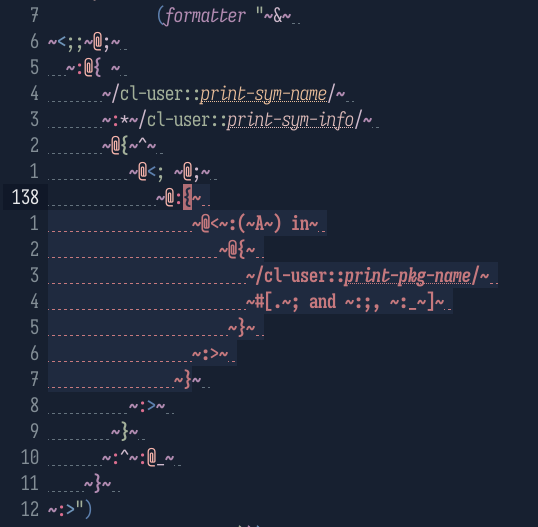
Figure 1: I actually wrote that before I made this package 😂
If this makes your eyes bleed, you can customize all those faces to look as boring as you'd like.
The highlighted ~{~} directive after the cursor is from show-paren-mode,
because lisp-ts-mode's syntax-propertize-function adds delimiter syntax to
format directives. This also means forward-sexp moves across those directives
like it does on regular lists.
The mode also has enhanced imenu support:

Figure 2: lisp-ts-mode is below. The command is consult-imenu
Aside from that, the truth is tree-sitter doesn't add nearly as much to most Lisp languages on its own compared to other languages. Emacs' syntax system is (unsurprisingly) extremely well suited to handling Lisp syntax (notably, it even has first class support for nested comments unlike tree-sitter). But the CST generated by tree-sitter enables some very fancy semantic font-lock, see the sister package gaudy-cl.
2. Getting started
This package is available on GNU ELPA, so here are some examples of how to activate:
(use-package lisp-ts-mode
  :ensure t)
If you use Doom Emacs, it's now available as a flag in the common-lisp module.
In the doom! block in your ~init.el:
(doom! ;; ...
       :tools
       tree-sitter
       :lang
       (common-lisp +tree-sitter)
       ;; ...
       )
If you use elpaca, you can use the following recipe:
(elpaca lisp-ts-mode)
For straight.el:
(straight-use-package 'lisp-ts-mode)
To automatically activate lisp-ts-mode wherever lisp-mode normally activates, use
(setf (alist-get 'lisp-mode major-mode-remap-alist) 'lisp-ts-mode)
You can add this to the :init section of use-package.
I also recommend this snippet:
(setf (alist-get 'lisp-ts-mode font-lock-ignore)
      lisp-ts-mode-font-lock-ignore-keywords)
You can place this in the :config section of use-package. This disables
font-lock keywords which are already handled by the tree-sitter based font-lock
rules.
Lastly, the FORMAT string support is a separate minor mode,
lisp-ts-format-support-mode. You can enable it with
(add-hook 'lisp-ts-mode-hook #'lisp-ts-format-support-mode)
But if you use gaudy-cl, it will apply the grammar on its own (and much more).
3. FORMAT directive indentation
There is optional (but currently enabled by default) auto-indentation of format
directives. Still somewhat experimental. This is mainly to indent relative to
the paired directives (~[, ~{, ~( and ~<). Example:
"~<
~A
 ~:>"
After pressing TAB on the second line:
"~<~@
   ~A
 ~:>"
The directive is indented to the column after the ~<, and the newline is
converted to a ~@<newline> directive so that the indentation of the output
isn't affected. The behavior depends on a few customizable variables:
lisp-ts-mode-format-indent-predicate- A predicate for
treesit-node-match-p(usually a function or regexp matching a treesit node's type) to determine which nodes should have their contents indented. By default it matches the four paired directives, but you can also set it to indent relative to the start of the entire format string. To disable format indentation entirely, set it to nil. lisp-ts-mode-format-indent-auto-escape-eol- Controls the behavior of the
newline directive. It can be set to nil (don't indent if there isn't already a
~<newline>), t (don't add it but indent anyway), a string specifying the directive prefix to add, or a cons pair(LOGICAL-BLOCK . DEFAULT)to specify a different string (like~:@_~) to use within~<~:>. lisp-ts-mode-format-indent-tilde-relativeDetermines which column is used as an anchor for calculating indentation (using the following two variables), and the indentation of the end of a paired directive when it begins a line. If nil (the default), the directive characters themselves are aligned, like
"~:@{~
     ~A~
   ~}"
If set to non-nil:
"~:@{~
  ~A~
 ~}"
If the value is the symbol
end, non-nil behavior applies to the end directive, but nil behavior applies to the contents:"~:@{~ ~A~ ~}"lisp-ts-mode-format-group-indent-offset- Number of columns added to indentation relative to the start of a paired directive.
lisp-ts-mode-format-string-indent-offset- Like the above but controls
indentation relative to the start of the string, if that's enabled by
lisp-ts-mode-format-indent-predicate. lisp-ts-mode-format-indent-function- This variable isn't customizable
because it's meant to be used with
add-function. This is the function called to perform the indentation, so you can wrap it to control if, when or how the indentation is performed.
For more details see each variable's documentation.
4. Font lock
There are distinct faces for every component of format directives I could think
of: ~, numeric, character, V and # parameters, the , separator between
parameters, : and @ modifiers and the directive character itself all have
specific faces. The paired directives (~[, ~{, ~( and ~<) have a
separate face from other directives, and you can customize
lisp-ts-mode-format-rainbow-delimiters to use rainbow-delimiters faces to
highlight those directives based on nesting level. There are also three faces
for each level of #||# comment nesting (the top level uses
font-lock-comment-face). See M-x customize-group RET lisp-ts-mode.
Old versions
| lisp-ts-mode-0.3.4.tar.lz | 2026-Aug-29 | 70.2 KiB |
| lisp-ts-mode-0.3.3.tar.lz | 2026-Aug-15 | 70.3 KiB |
| lisp-ts-mode-0.3.2.tar.lz | 2026-Aug-01 | 70.3 KiB |
| lisp-ts-mode-0.3.0.tar.lz | 2026-Jul-20 | 70.1 KiB |
| lisp-ts-mode-0.2.1.tar.lz | 2026-Jul-02 | 70.6 KiB |
| lisp-ts-mode-0.2.0.tar.lz | 2026-Jun-28 | 69.0 KiB |